A new feature in the Employers Toolbox makes it easy to manage staff attendance in your workplace. From both a safety and record-keeping point of view it's always important to know exactly who is in your workplace at any given point.
While the visitor portal has been a feature of the Employers Toolbox for many years, a similar functionality now exists for staff.

Click to zoom
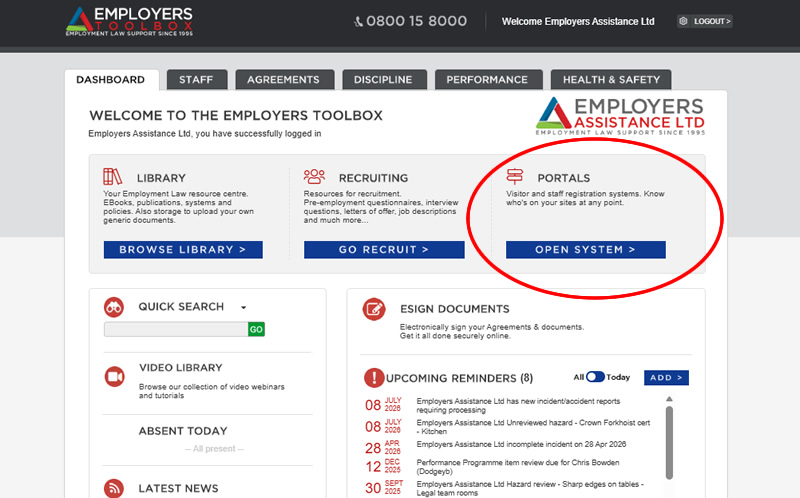
From the Dashboard of your Employers Toolbox on the right hand side you have access to both portals. Clicking 'Open System' under the
Portals title will take you through to a screen which offers you access to the settings and control of both portals.
Click to zoom
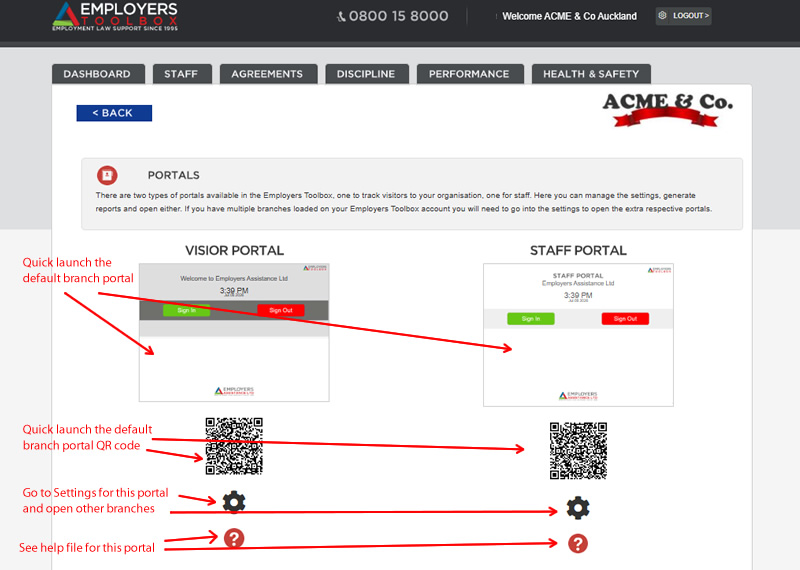
From there you can launch either portal, access and configure the settings for each, Use the QR code to launch on another device using your camera and read the help file for both systems.
If your Employers Toolbox is configured with multiple branches you can access those other branches through the Settings 'cog' also. This includes the ability to launch those other branch portals.
Staff Portal Settings
To use the staff portal effectively your staff need to be loaded in the
Staff section of your Employers Toolbox. Without having them loaded the system cannot look them up and record the activity.
In a similar way to the Visitor Portal, the Staff Portal has configuration options via the cog icon in the portals screen. There are slightly less features in the staff portal due to the more concise functionality and requirements around tracking staff.
The options within the staff portal are to display the current date & time or not, alert via email when someone signs in or out, and you also have the option to include a welcome message when someone signs in. You have a full HTML enabled design panel to customise you message if you wish. All the usual reporting & exporting features also exist in the same way as the visitor portal.
LOGIN NOW >